

The AI Staff Member for Discord Communities

Run your Discord server with plain English

Just tell RyxAI what to do. It understands your server, takes the right admin action, answers member questions, and keeps your community engaged — 24/7.

Add to Discord — Free 3-Day Trial
*No credit card required  ·  Every feature unlocked for 3 days
🛡️ My Server
General
# general
# welcome
# introductions
Admin
# admin-cmds
# mod-logs
# general
JD
JohnDoe99Today at 2:14 PM
hey check this out discord.gg/freenitro — unlimited free nitro!!
JD
JohnDoe99Today at 2:14 PM
discord.gg/freenitro 🎁 discord.gg/freenitro discord.gg/free
Rx
RyxAIBOTToday at 2:14 PM
🚫 Invite links from @JohnDoe99 were removed instantly. Alert posted in #mod-logs.
Rx
RyxAIBOTToday at 2:14 PM
Invite Link Blocking is ON — spam like this never reaches your members.
SA
ServerAdminToday at 4:02 PM
Hey RyxAI, give new members the Newbie role for their first 2 weeks
Rx
RyxAIBOTToday at 4:02 PM
✅ Got it! Rule active — every new member gets Newbie on join, removed automatically after 14 days.
Rx
RyxAIBOTToday at 4:03 PM
👋 3 new members just got @Newbie — removal scheduled in 14 days. Logged in #mod-logs.
RyxAI is typing

The smarter way to run your Discord server

Stop memorizing slash commands and chasing rule-breakers manually. RyxAI is your always-on AI team member that understands English and acts instantly.

Agentic Moderation

RyxAI doesn't just flag content — it takes action. Mute, kick, ban, warn, or pin messages based on your plain-English rules.

Natural Language Commands

Type what you want in plain English. RyxAI interprets it and maps it to the exact Discord admin action — no bot syntax needed.

Community Engagement

RyxAI isn't just a watchdog — it welcomes new members, sparks conversations, and keeps your community active and growing.

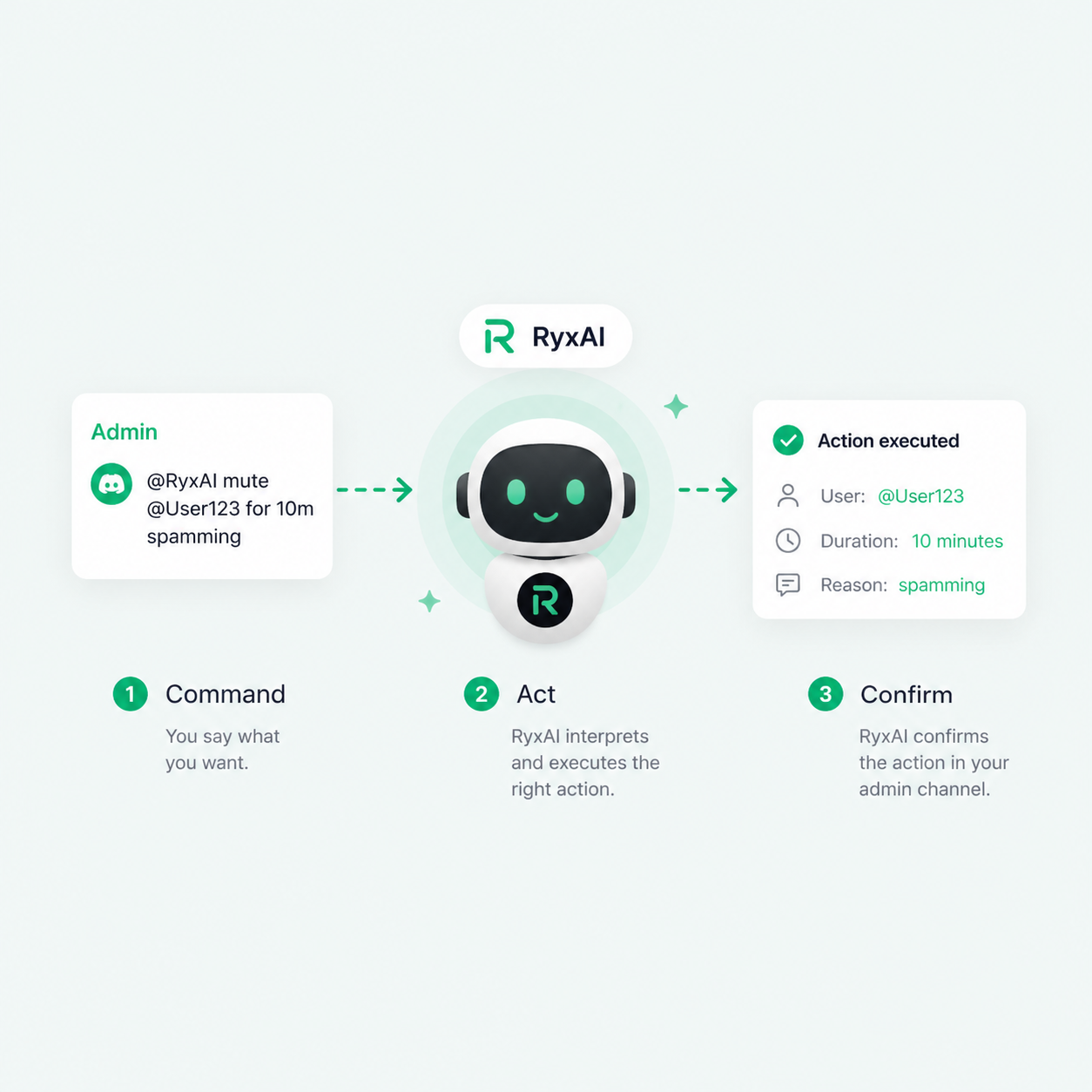
Step 1 — Command

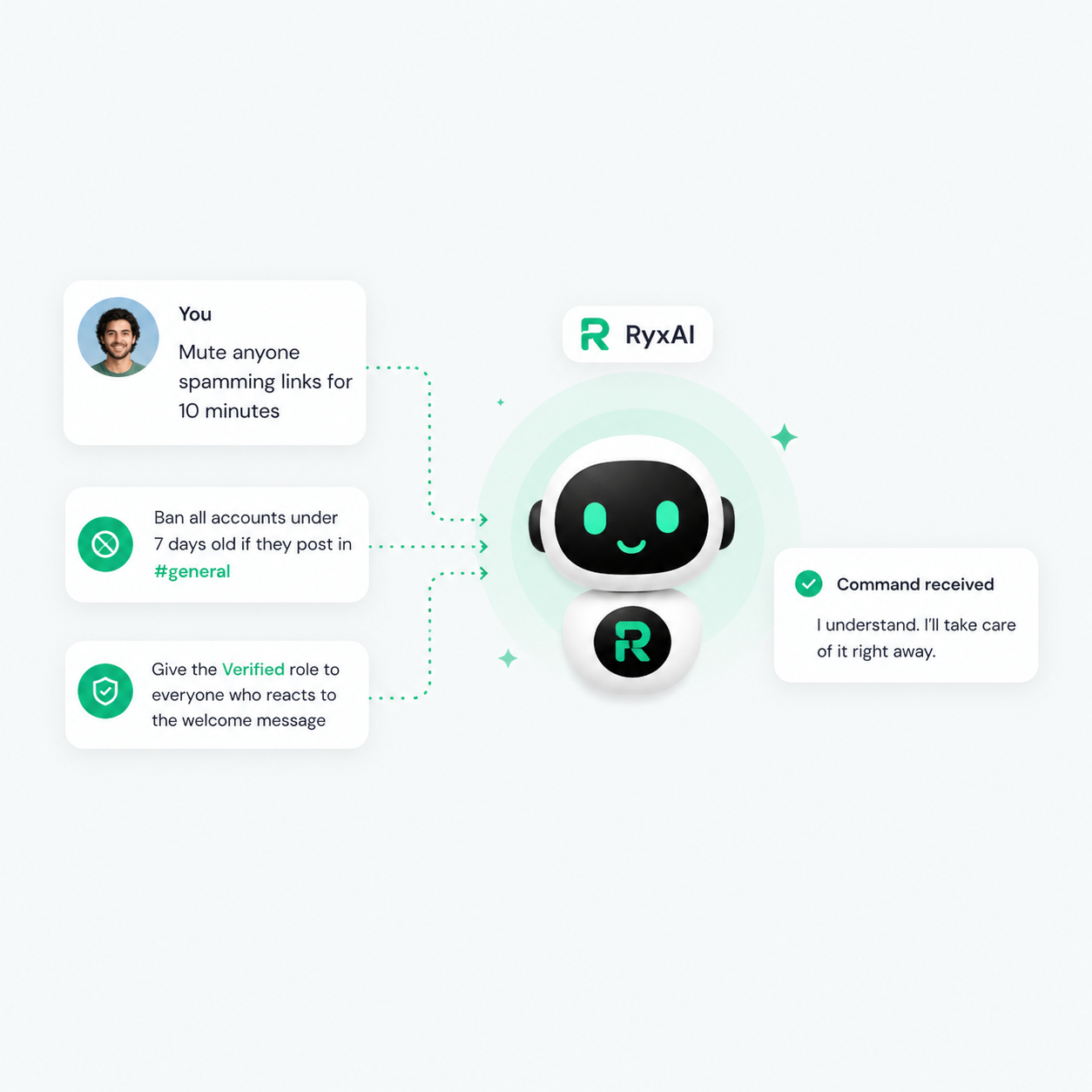
Tell RyxAI what you want in plain English

No more memorizing Discord slash commands or configuring complex bot flows. Just message RyxAI like you'd message a human team member — it understands context, intent, and urgency.

checkmark
"Mute anyone spamming links for 10 minutes"
checkmark
"Ban all accounts under 7 days old if they post in #general"
checkmark
"Post a recap of today's chat every evening at 8pm"
RyxAI natural language command interface
RyxAI command to action flow
Step 2 — Act

RyxAI interprets and executes the right action

RyxAI's agentic AI engine translates your English command into the exact Discord admin action — and executes it immediately. Kick, ban, mute, warn, assign roles, pin messages, and more.

checkmark
Executes actions in real time with full audit trail
checkmark
Confirms what it did in your admin channel
checkmark
Asks for clarification if your command is ambiguous
Step 3 — Engage

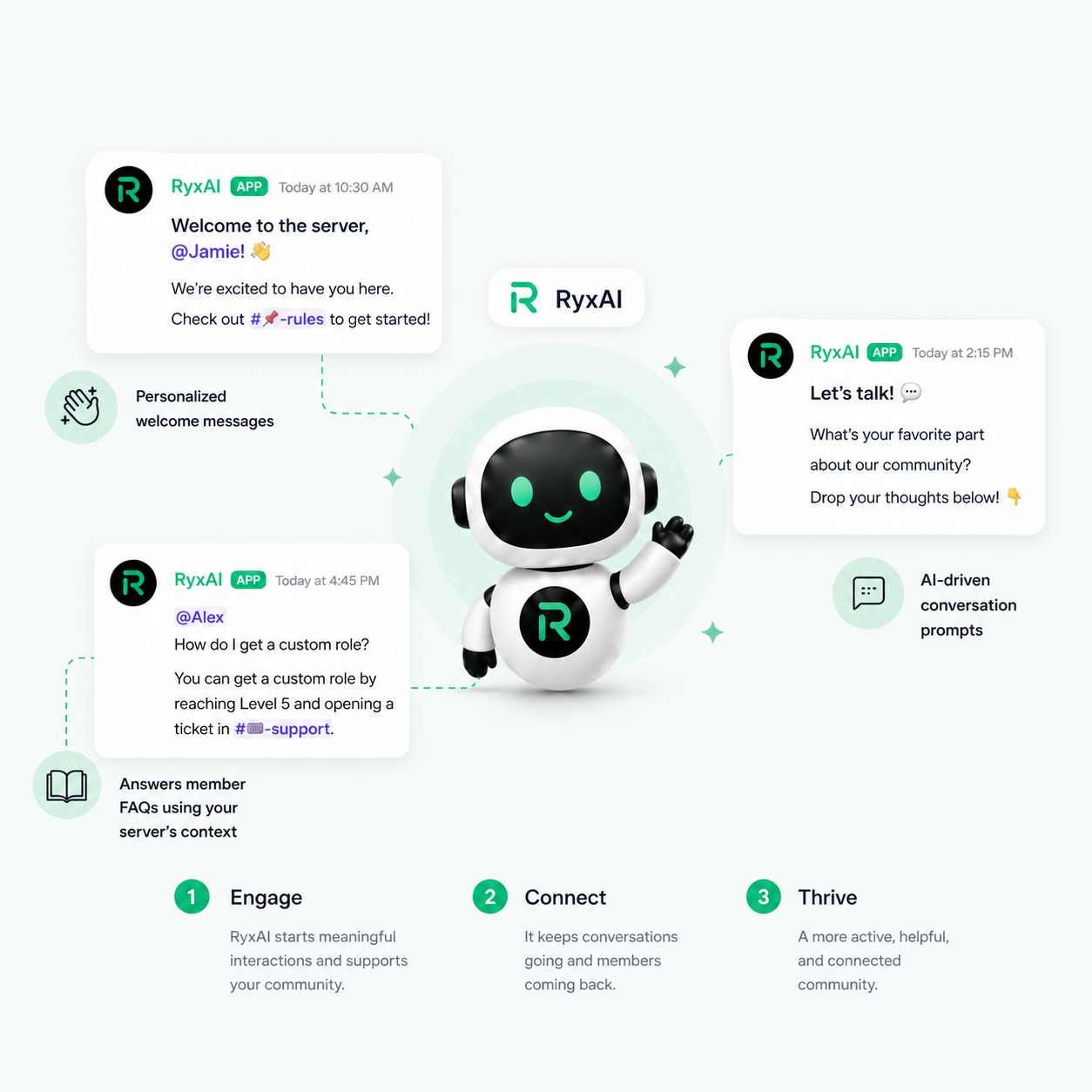
RyxAI keeps your community alive on its own

Beyond moderation, RyxAI acts as a genuine community member — welcoming newcomers, answering questions, celebrating milestones, and driving conversations that would otherwise go quiet.
checkmark
Personalized welcome messages for every new member
checkmark
AI-driven conversation prompts to boost daily activity
checkmark
Answers member FAQs using your server's context
RyxAI community engagement

Everything your server needs..

Smart Auto-Moderation

Set moderation rules in plain English. RyxAI watches every message and link, catches image spam — and acts without you being online.
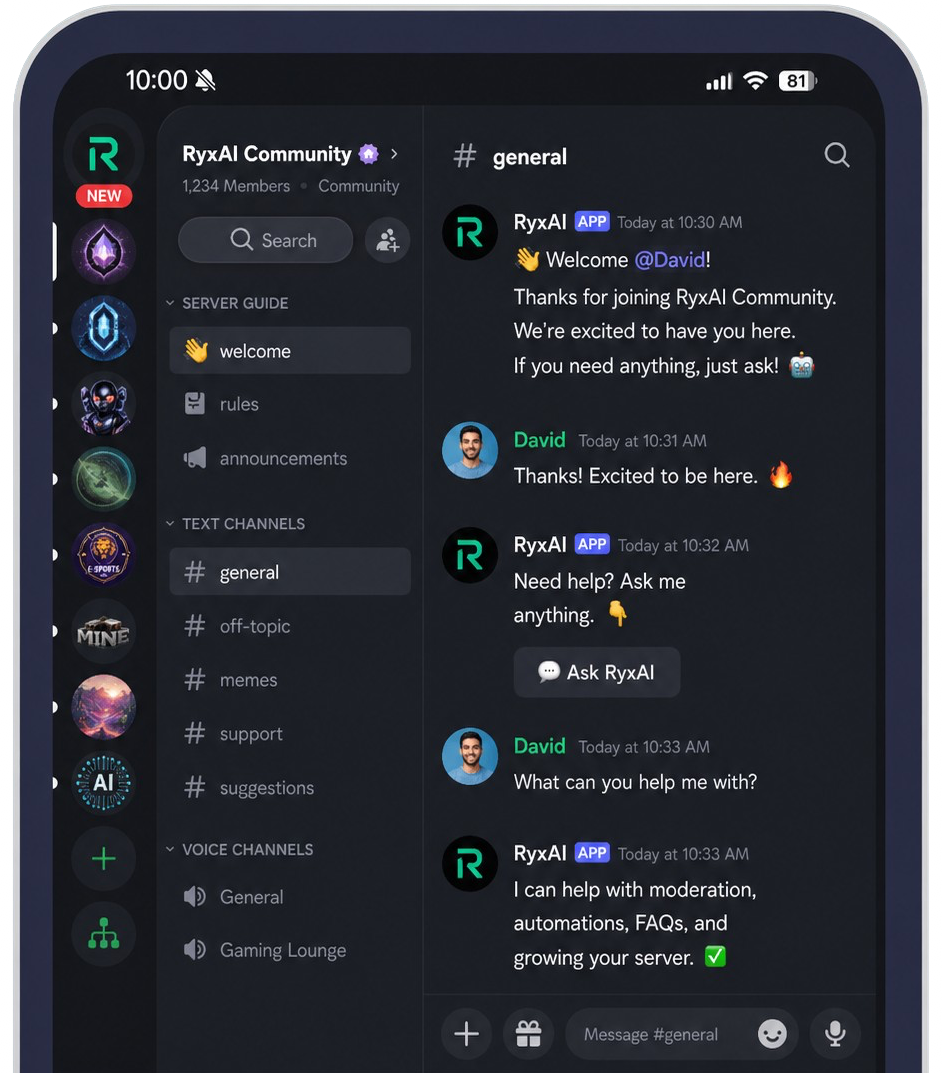
Auto-moderation

24/7 Always Active

RyxAI never sleeps, never takes breaks, and never misses a violation. Your server is protected around the clock.

Engagement AI

RyxAI participates in your community — starting topics, replying to members, and keeping your server feeling alive and active.

Role Automation

Assign, revoke, and manage Discord roles automatically — reaction roles, join rules, and scheduled or temporary roles, all in plain English.

Moderation Analytics

See every action RyxAI takes, track trends in violations, and understand your community's health at a glance.

Add to Discord — Free 3-Day Trial
TOP BENEFITS

Why server admins choose RyxAI

Server admin using RyxAI
Your server, protected from minute one

Add RyxAI and tell it your rules in plain English. It starts moderating immediately — no complex config, no YAML files, no bot documentation to read. It covers the vast majority of day-to-day admin work, and tells you honestly when a request is outside its reach.

Add to Discord
Server admin using RyxAI
Admin at the speed of thought

Stop digging through Discord's permission menus or bot documentation. Message RyxAI directly: "mute this user for 30 minutes for toxicity" and it's done. RyxAI confirms every action so you're always in control.

See How It Works
Community engagement
Turn a quiet server into an active one

RyxAI greets every new member, answers common questions, posts conversation starters when chat goes quiet, and celebrates birthdays and boosts — so your community keeps moving even when you're away.

View Pricing

Works with the tools you already use

Add to Discord
RyxAI in action

Built to give admins their time back

RyxAI watches your channels around the clock, removes spam and scams instantly, and queues everything judgment-based for one-tap approval — so you check in on your schedule, not your server's.

Always Watching
24
/7
Admin Actions
80
+
See How It Works

@RyxAI at your finger tips

From small to large gaming communities — RyxAI keeps every server safe, active, and growing without the admin burden.
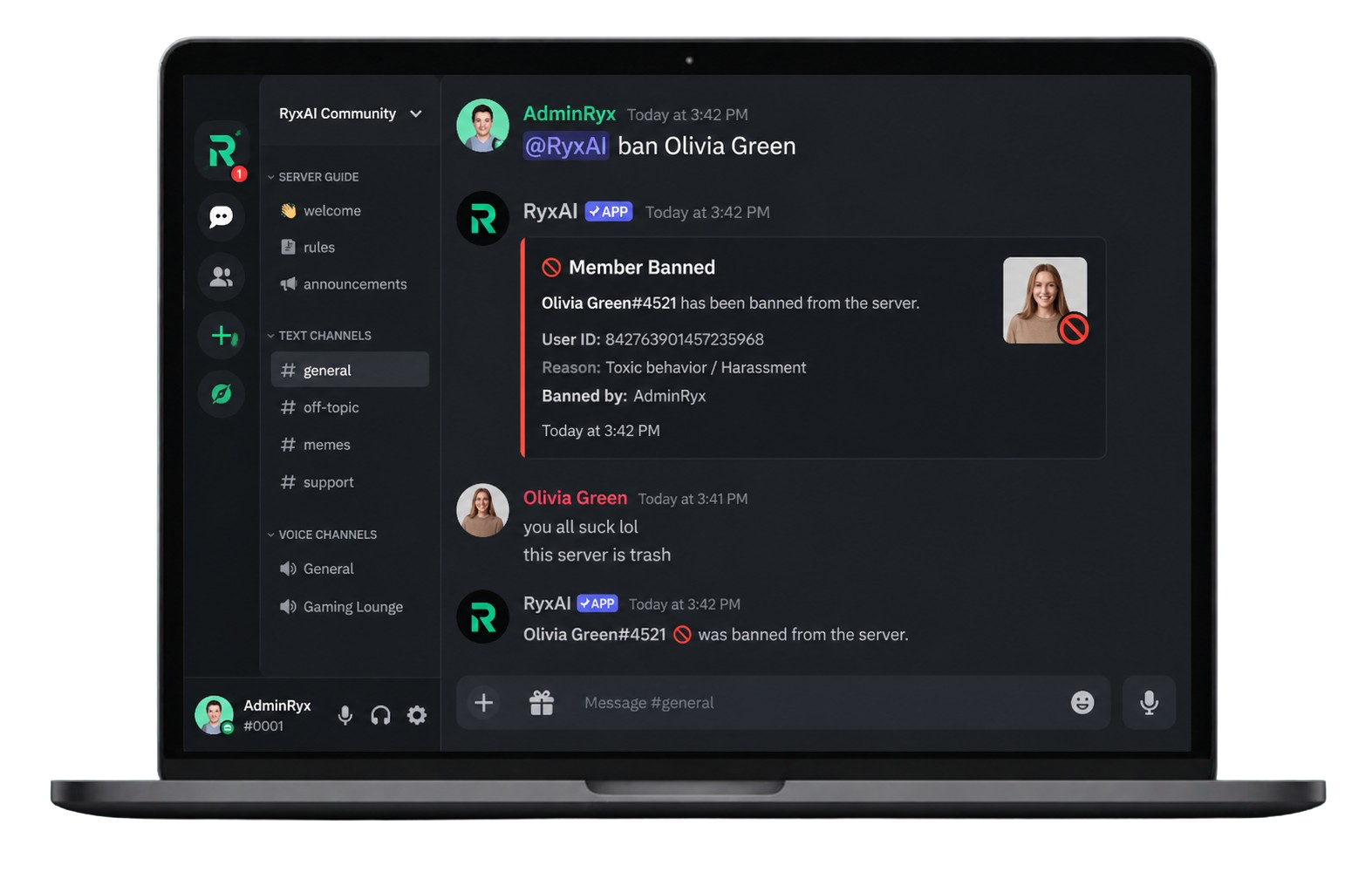
RyxAI demo

Built for gaming, creator, and community servers of every size

Server logo
Server logo
Server logo
Server logo
Server logo
Server logo
Server logo
Server logo
Server logo
Server logo
24/7
Always-On Moderation
Every message, every channel
🛡️

"Block invite links in #general" — say it once and RyxAI enforces it around the clock. No setup wizards, no documentation to read.

Agentic Moderation
Plain-English rules, enforced 24/7
💬

RyxAI writes a personal welcome for every new member, celebrates birthdays and boosts, and drops a conversation starter when chat goes quiet.

Engagement AI
Welcomes · prompts · celebrations

It understands what you mean, not just what you type — and every significant action is confirmation-gated with a full audit trail and one-click undo.

Natural Language Control
Confirmations · audit log · undo

Simple, transparent pricing

Every server starts with a 3-day Trial Run — full features, no credit card. Monthly AI credits included on every plan; top up anytime. Very active servers should pick Guild or Creator / Enterprise.

Trial Run

Every server starts here
$0 for 3 days
Every feature unlocked — full access
AI moderation, engagement & admin commands
No credit card required
Starts the moment RyxAI joins
Spam & scam protection stays free forever

Squad

For smaller communities
$14.99/month
5 RyxAI AI credits included monthly
AI moderation, chat & engagement
Natural-language admin commands
Top up credits anytime
Moderation analytics dashboard
Priority email support

Creator / Enterprise

For creators, agencies, large Discords & serious community teams
Everything in Guild, with a custom AI credit allowance
Multi-server plans (via sales)
Custom bot name, avatar & banner for your server
Custom persona & behavior profile
Dedicated Discord support channel
White-glove onboarding

Trial Run

Every server starts here
$0 for 3 days
Every feature unlocked — full access
AI moderation, engagement & admin commands
No credit card required

Squad Save 20%

For smaller communities, billed annually
$12/month billed yearly
5 RyxAI AI credits included monthly
AI moderation, chat & engagement
Top up credits anytime
Priority support

Creator / Enterprise

Custom annual pricing via sales
Everything in Guild, with a custom AI credit allowance
Multi-server plans (via sales)
Custom bot identity & white-glove onboarding
Frequently asked questions
What does "agentic" mean for a Discord bot?

Traditional bots respond to fixed slash commands — you have to know the exact syntax. An agentic AI like RyxAI understands natural language, figures out what you mean, and takes the appropriate action on its own. It can also act proactively — spotting violations before you even notice them.

What admin actions can RyxAI actually take?

RyxAI can kick, ban, mute, timeout, warn, assign or revoke roles, delete messages, pin messages, slow-mode channels, lock channels, send DMs to members, and post in specified channels — plus manage channels, roles, scheduled events, and announcements. It covers the vast majority of day-to-day admin work, triggered by your commands or by its moderation rules, and it tells you honestly when a request is outside its reach.

Is my server's data safe?

Yes. RyxAI only reads the messages and context required to perform moderation and engagement actions. We never sell or share your server data. All traffic is encrypted in transit and stored on managed, access-controlled infrastructure. You can revoke RyxAI's access at any time directly from your Discord server settings.

Can I customize RyxAI's personality and tone?

Yes — you can describe a custom tone and persona for RyxAI in plain English — friendly, professional, playful, strict, and more — plus set who it calls "boss" for your server. Enterprise customers can fully rebrand the bot for their server — custom name, avatar, and banner, applied to that server only — with a behavior profile tailored to their community and white-glove onboarding.

How does the free trial work?

The moment RyxAI joins your server, a 3-day Trial Run starts with every feature unlocked — AI moderation, natural-language admin commands, engagement AI, meeting summaries, and the analytics dashboard. No credit card required. When the trial ends, pick a plan to keep the AI features running; built-in spam, invite-link, and scam protection stays free forever. Removing and re-adding the bot doesn't restart the trial.

What are RyxAI AI credits?

AI credits are the simple unit that powers everything intelligent RyxAI does — AI moderation scans, chat & engagement replies, admin and tool reasoning, and meeting summaries. One credit is worth $1. Your plan includes a monthly allowance (Squad: 5, Guild: 20, Creator / Enterprise: custom), and you can top up anytime. Built-in spam, invite-link, and scam protection never uses credits.

What happens when credits run out?

AI features pause until the next billing period or until you add credits — RyxAI notifies your admin channel rather than silently disappearing. Deterministic protection (spam, invite links, scams), birthdays, and scheduled roles keep running because they don't use AI. Top up from the dashboard's Billing tab to resume instantly.

Can I top up?

Yes — $10, $25, $50, or $100 at a time, from the dashboard's Billing tab, on any paid plan. Top-ups add credits to your current billing period immediately and never change your subscription tier.

Do credits roll over?

Not currently — included credits and top-ups apply to the billing period they're purchased in, and everything resets on the 1st of each month. Top-up rollover is on our roadmap.

Why isn't there an unlimited AI plan?

Every AI action has a real compute cost, and "unlimited" plans quietly pay for heavy servers by degrading everyone else. Credits keep it honest: you always know what's included, quiet months cost less than busy ones, and very active servers can scale up with Guild, Creator / Enterprise, or top-ups instead of hitting hidden throttles.

Which tier is right for active servers?

Squad fits smaller communities with steady but moderate chat. Very active servers should pick Guild or Creator / Enterprise — more included credits, meeting summaries, and room to top up during busy events. The dashboard's Billing tab shows exactly where your credits go each month, so it's easy to tell when you've outgrown a tier.

Are meeting summaries included?

Voice-meeting recording with AI transcription and summaries is a Guild and Creator / Enterprise feature (and included in the Trial Run so you can try it). Summaries consume AI credits like other AI features — long meetings use more.

The AI staff member for Discord communities — powerful from day one
Free 3-day trial on every server · No credit card required